
An AI label is a starting point for reading your assessment instructions. To understand it, match the label to your university’s current definition, then find the permitted activities, limits and disclosure requirements for that exact task. Do not transfer a rule from another university or assume a familiar tool is automatically allowed.
This guide compares university AI policy assessment categories in the UK through three named examples: Manchester, Greenwich and Bath. Their systems are different. Use the comparison to identify what to look for in your own brief, rather than to choose the most generous rule.

Why the Same Word Means Different Things at Different Universities
“AI permitted” can leave several practical questions unanswered. May you ask for planning suggestions? Request feedback on your own paragraph? Generate code? Include generated material in the final submission? A category may point towards an answer, but the accompanying instructions supply the detail.
Read the assessment as a whole. Write down its title, module, academic year and category before comparing it with guidance. Then identify the action you intend to take. “Use an editing tool” is vague; “ask it to flag punctuation errors without rewriting sentences” gives your teaching team something specific to assess.
Avoid building a personal permission rule from a friend’s module or an old screenshot. If documents appear inconsistent, retain both and ask which applies. A cautious interpretation should not erase agreed accessibility support; ask the relevant teams how the arrangements work together.

Four-Category, Tiered and Two-Lane Systems Compared
The rows below are grouped by institution deliberately. A Manchester category is not a translation of a Greenwich tier or a Bath lane. The dates help you recognise when older material may belong to a previous system.
Manchester’s Four Categories
| Category | Meaning at Manchester | What to Find in the Brief |
|---|---|---|
| AI Prohibited | AI is not permitted or cannot be used. | Clarifying examples where supplied. |
| AI Minimal | Limited presentation support; ideas, arguments and conclusions stay the student’s. | Which surface-level activities are acceptable. |
| AI Permitted | AI may be used to complete the assessment, within stated acceptable uses. | The scope of permission and the route for students choosing non-use. |
| AI-Integrated | AI is necessary for the learning outcomes; this is not unrestricted permission. | Why AI is required and which uses are acceptable. |
Table 1. Manchester: policy effective 1 September 2026.
Source: Manchester AI in Teaching and Learning Policy
Greenwich’s Three Tiers
| Tier | Meaning at Greenwich | What to Check Next |
|---|---|---|
| 1: Independent of AI | Restricted use for demonstrating individual knowledge, skills, judgement or performance. | How approved accessibility tools apply. |
| 2: Supported by AI | Support for activities such as planning, clarification, feedback and refinement. | Your responsibility for the argument and analysis; task-specific instructions. |
| 3: Augmented with AI | AI forms an intentional part of the task. | How critical direction, evaluation and explanation of AI-supported work are assessed. |
Table 2. Greenwich: current 2026/27 guidance.
Greenwich also uses an AI Reflection, explaining the tool’s role, how output was evaluated and the student’s contribution. Check the current instructions for its format and placement.
Source: Greenwich’s 2026/27 AI guidance
Bath’s Open and Closed Lanes
| Lane | Meaning at Bath | What to Check Next |
|---|---|---|
| Closed lane | GenAI is not permitted and assessment conditions are designed to prevent access. | The conditions of the particular assessment. |
| Open lane | GenAI use is authorised within academic integrity requirements. | How the task frames use, learning outcomes and acknowledgement. |
Table 3. Bath: two lanes replaced the ABC framework from September 2026.
Bath’s current guidance says written or otherwise recorded coursework is open lane. It also distinguishes permission from tasks that ask students to engage with AI. Therefore, do not use an older Bath “Type A/B/C” page as the current decision guide without checking the academic year.
Source: Bath’s two-lane framework and FAQs
What “Minimal” Often Covers—and Where It Stops
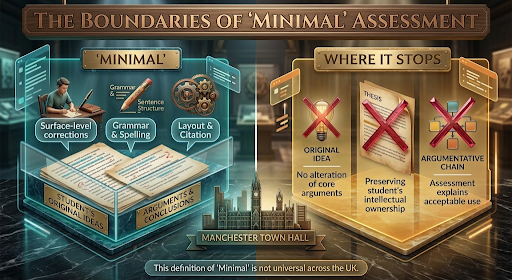
Use Manchester as a specific example of this boundary. Its Minimal category includes surface-level improvements to grammar, fluency and formatting without changing the student’s ideas, arguments or conclusions. The assessment must still explain acceptable use. This is not a shared UK definition.
Before accepting an editing suggestion, describe the change it makes. Correcting a spelling error and supplying a missing explanation are different actions. Likewise, a request to “make this stronger” is too broad to establish whether the result remains within a presentation-only limit.
| Feature or Action | What to Examine | Question to Ask |
|---|---|---|
| Basic spelling correction | A surface error versus a change of meaning. | Does this task allow basic checking? |
| Sentence rewriting | Changes to meaning, emphasis, fluency or structure. | Which types of rewriting, if any, are within scope? |
| Argument generation | New claims, reasoning, evidence or conclusions. | Is this substantive contribution permitted for this component? |
| Dictation or text-to-speech | Access function and any additional generation features. | How do my support arrangements apply to this feature? |
Table 4. Questions for interpreting a feature; not universal permission decisions.
Check settings and the action you actually use, not just the product name. A tool may offer basic checking alongside broader rewriting or generation. If the brief names a brand but not its functions, ask what the permission covers.
Related guide: Check university policy before using proofreading support
Labels, Assistive Tools and Reasonable Adjustments
Greenwich provides a useful verified distinction. Its guidance normally permits assistive functions such as dictation, screen readers, captions and text-to-speech, while requiring assessment briefs to state restrictions and consider support arrangements. AI-enabled editing, including grammar suggestions or rewriting, needs assessment-specific permission.
Source: Greenwich’s AI tools and permitted uses
That distinction helps you ask a better question: is the feature providing access, transforming your expression or producing content? Describe what happens when you activate it. A familiar accessibility product can contain functions with different effects, so the product name may leave the issue unresolved.
If the assessment label seems to conflict with agreed support, contact your module team and disability support service. Ask how the adjustment applies to the specific task and feature. Keep the response with your support documentation. Avoid disabling established support simply because a broad label is unclear.
If the Brief Is Silent or Unclear
First look for the full assessment information rather than the label alone: the downloadable brief, module learning platform, instructions beside the submission point and current institutional guidance. Record the precise uncertainty. A missing category and a disagreement between two instructions need different questions.
The fictional example below shows the kinds of details to locate. Its wording is invented for teaching purposes. It does not represent any university’s policy or authorise these actions in your assessment.

What the Label Does Not Tell You
Use this list to find missing information rather than assume permission. You may need to establish:
- Which exact functions and activities are allowed, including any limits on rewriting or generation.
- Which stages and components are covered: planning, feedback, code, images or final submitted text.
- Whether AI is optional, encouraged or required for the learning outcomes.
- How approved support arrangements apply to the assessment conditions.
- What acknowledgement, reflection, prompts or other records are expected.
- Whether the instructions apply to the current assessment and academic year.
Where instructions conflict, quote both passages and ask the module team to resolve them. While you wait, continue reading, taking your own notes or drafting in ways that do not rely on the disputed use. Keep the written clarification; if the answer remains ambiguous, ask a narrower follow-up.

Email Template to Your Module Leader
Adapt the fields below. Include only the proposed actions you actually need clarified. If accessibility arrangements are relevant, describe the functional issue without sharing unnecessary personal information.
| Email Field | Suggested Wording |
|---|---|
| Subject | AI-use clarification: [module code] — [assessment title] |
| Message | Dear [name], I am preparing [assessment, deadline]. The brief says “[exact wording]”, but I am unsure whether this permits [specific action]. I would like to use [tool and feature] to [purpose]. It would [describe the change], rather than [action you do not intend]. Could you confirm whether this is permitted for this assessment and component? Please also confirm any required acknowledgement, reflection or records. [If relevant: How should this instruction be read alongside my agreed support arrangements?] [If instructions conflict: The module page also says “[wording]”. Which instruction applies?] I will wait for clarification before using the disputed feature. Kind regards, [name / student number] |
Table 5. An adaptable clarification request, not a formal university form.
Save the reply with the assessment instructions. If it changes the stated category or explains a missing rule, ask whether the module information will be updated so everyone has the same instructions. Permission for this task should not be assumed to apply elsewhere.
Once permission is clear, consider the separate question of how you retain your judgement while using assistance. Our critical-thinking guide addresses that learning question without replacing your assessment rules.
Further reading: AI and critical thinking — a student’s self-check

Frequently Asked Questions
Does “Minimal AI” Allow Grammarly?
Check your university’s definition and the specific feature. Manchester’s Minimal category concerns presentation without changing ideas, arguments or conclusions; its library guidance separately discusses basic grammar and spelling checks. That does not authorise every Grammarly function. Identify whether you want error flags, sentence rewriting or generated content, then check the assessment instructions or ask your teaching team.
What if My Brief Has No AI Category?
Ask the module leader or assessment setter in writing, naming the assessment and the exact feature you want to use. Check the module page and current institutional guidance first, then quote any missing or conflicting instructions. Keep the reply with your brief. Until clarified, continue work that does not depend on the disputed permission.
Can I Choose Not to Use AI in an “Integrated” Assessment?
Do not assume so. Manchester’s policy makes AI necessary in Category D, AI-Integrated assessments; its general non-use choice excludes that category. Bath’s open lane can include tasks requiring AI engagement, and its guidance asks staff to discuss objections and consider alternatives meeting learning outcomes. Check your own task and raise concerns early; an alternative is not automatic.
Do Assistive-Technology AI Features Count?
Some guidance explicitly covers these functions. Greenwich lists dictation and text-to-speech as normally permitted assistive technology, subject to assessment instructions and consideration of support arrangements. It treats AI-enabled editing separately. Describe the particular feature to your module and disability support teams if unclear, rather than assuming every function in an assistive product has the same permission.
Manchester library guidance on AI categories and referencing