
To declare AI use in a university assignment, start with the required form or wording. Identify the tool, explain what it did, describe how you used or changed its output, and place the statement where your assessment instructions specify. Include prompts or additional records when requested. Your statement should describe what happened, not what sounds most reassuring.
This guide helps you draft that account through illustrative examples. It assumes your assessment allows the activities described. Learn how to declare AI use in a university assignment. A declaration does not make prohibited use permissible, and a general example cannot replace a mandatory institutional statement.

Declaration vs Reflection vs Citation: Three Different Things
Begin by identifying the type of account requested. These terms can overlap in local guidance, so read the actual questions and instructions rather than relying on the heading alone.
| Type | Main Function | What It Does Not Replace |
|---|---|---|
| Declaration or acknowledgement | Records the tool’s contribution and the scope of use. | A required reflection on decisions and learning. |
| Reflection | Evaluates how you directed, checked and changed the assistance. | A factual account of which tool and activities were involved. |
| Citation | Identifies a tool or output using the required referencing convention. | A broader disclosure or reflection when separately required. |
Table 1. Working distinctions; follow your institution’s terminology and requirements.
King’s student guidance distinguishes acknowledgement from treating generative AI as an authoritative reference source. Greenwich asks students to reflect on how they used and evaluated assistance. These examples show why adding a tool name to a bibliography may not answer the questions your assessor has asked.
King’s student guidance: acknowledgement requirements
Read your instructions as a set of tasks: complete the form, explain the contribution, provide any reflection and apply any required referencing format. If two instructions appear inconsistent, ask your module team which applies before choosing a format yourself.
What Most Templates Ask For
There is no universal declaration template. The table below combines fields from one verified sample with practical records you can gather while working. It is not a claim that every university requires every item.
Cambridge’s School of the Humanities and Social Sciences offers a sample rubric that departments may adopt. It asks which permitted use is being acknowledged, the tool and version, the prompt, its purpose and how the output was used or changed. Local assessment guidance remains essential.
Cambridge SHSS: sample declaration rubric
| Detail | What to Write or Gather | Status |
|---|---|---|
| Permitted activity | The particular use authorised for this task. | Cambridge sample field. |
| Tool and version | Actual name and version, if identifiable. | Cambridge sample field. |
| Prompt | The instruction you actually entered. | Cambridge sample field. |
| Purpose | What you asked the tool to help with. | Cambridge sample field. |
| Output and changes | What you used, rejected or modified. | Cambridge sample field. |
| Date and affected section | When you used it and where it contributed. | Suggested working record; include if requested. |
| Checks and decisions | What you verified and why you accepted or rejected suggestions. | Useful for reflection; follow the required questions. |
Table 2. Separate required template fields from useful working records.
Make notes at the time of use. For example: “Requested three planning questions; retained one; checked its relevance against the task.” That is easier to turn into an accurate declaration than a vague memory at submission.
If the version is not visible, record what you can establish and ask how to complete that field. Do not guess. Likewise, distinguish an exact saved prompt from a later summary of the interaction. Label the latter honestly if your teaching team permits that format.
Worked Example: Light Use—Brainstorming and Grammar
Treat these as two different activities. Preparatory brainstorming can influence the direction of a piece even if no generated sentence appears in the submission. A grammar function may make a narrower contribution. Describe each activity separately if both occurred.
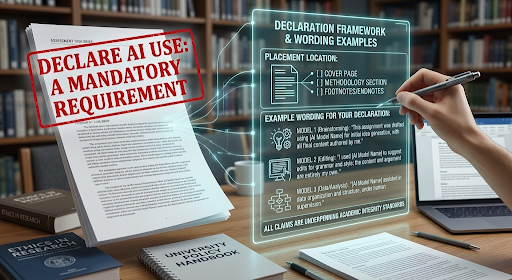
Example A: Brainstorming
Illustrative wording: use only if this activity was permitted, accurately describes your work and fits your required format.
“I used [tool and version] to suggest possible questions about [topic]. My prompt was: ‘Suggest three questions I could investigate about [topic]; do not draft an answer.’ I selected [question], narrowed its scope using [course material], and developed the outline myself. I did not use the other suggestions.”
The statement identifies an input and a decision. Replace the bracketed details and final sentence with what actually happened. If the tool also supplied an outline, disclose that rather than leaving the impression that it only suggested questions.
Example B: Grammar Checking
Illustrative wording: use only if this activity was permitted, accurately describes your work and fits your required format.
“I used [tool and feature] to flag grammar and punctuation issues in [sections]. I reviewed the suggestions and accepted [describe corrections]. I rejected [suggestion] because it changed my intended meaning. I did not use the tool to generate content or restructure my argument.”
Keep the last sentence only if true. If the feature rewrote sentences, say so and describe the scope. Do not call extensive rewriting “spell-checking”. Check whether your institution wants a separate statement for this activity or treats it within prescribed wording.

Worked Example: Heavier Use—Summarising and Drafting Support
A more substantial contribution needs a more specific account, not simply a longer list of tool names. The following fictional scenario assumes explicit permission for summarising and drafting support, and permission to share the material involved. It is not a recommendation to upload restricted readings or research data.
Illustrative wording: use only if this activity was permitted, accurately describes your work and fits your required format.
| Illustrative Wording | What the Sentence Discloses |
|---|---|
| “I used [tool/version] to summarise [permitted material] and suggest a draft explanation for [section].” | Names both activities and the affected material. |
| “My prompt was [actual saved prompt].” | Provides the real instruction where requested. |
| “I compared the summary with [original source and location], corrected [specific omission], and rejected [unsupported point].” | States completed checks and a concrete decision. |
| “The final [section] retains [identify generated wording or structure] after [describe revisions].” | Makes retained AI contribution visible. |
| “I developed [identify own analysis] and selected the evidence for [claim].” | Defines the student’s contribution without denying the tool’s role. |
Table 3. Build the account from your actual workflow; do not claim checks you did not perform.
If you retained generated text, describe it plainly. Changing some words does not make “no AI-generated content was used” an accurate description. Equally, if you rejected all drafted text but kept a suggested structure, explain that distinction.
Adding a Reflective Element
“The suggested explanation omitted [limitation]. Comparing it with [source] showed why the limitation mattered, so I added it and removed [claim]. I retained [element] because [reason]. This changed my approach by [specific effect], while [identified decision or analysis] remained my responsibility.”
Use the reflective extension only where it matches your process. A reflection should make an actual judgement visible. “I critically evaluated everything” offers less information than one concrete account of a correction, rejection or limitation. If evaluation was incomplete, complete the necessary work rather than using polished wording to conceal the gap.
Where It Goes: Declaration Page, References or Reflective Statement
Placement is part of the requirement. Use the specified location and any submission form; do not choose a convenient position because another institution uses it. Check whether the statement belongs inside the assignment file, in a cover sheet or through a separate submission field.
| Instruction or Example | Placement | Important Qualification |
|---|---|---|
| King’s published student guidance | Declaration along with the references. | Use alternative wording if the assessment brief supplies it. |
| Greenwich student guidance | AI Reflection at the end, before the references. | Follow the required reflective content and task instructions. |
| A prescribed declaration page or form | The page or submission route named in your brief. | A conditional option, not a universal requirement. |
| Prompts or outputs requested as an appendix | The appendix location and format specified. | Do not assume a full transcript is always required. |
Table 4. Institution-specific examples and conditional placement options.
Greenwich’s 2026/27 update replaces the former AI Declaration form with a reflective statement. Its student guide specifies the position before the references. Avoid completing an older form merely because it remains in your saved files.
Greenwich: 2026/27 change to reflective statements
Greenwich: AI Reflection instructions and placement

Mistakes to Avoid
A useful declaration is accurate before it is elegant. Avoid these common drafting problems:
- Vague scope: replace “AI helped me” with the actual activity and affected section.
- Omitted preparation: mention planning or idea support when disclosure of that use is required, even if you did not paste output.
- False authorship claims: do not say everything was written independently if generated wording or structure was retained.
- Invented verification: only state that you checked sources, calculations or quotations if you actually did.
- Generic reflection: identify a real decision rather than claiming you were “critical” without explanation.
- Wrong format: use mandatory wording and attachments rather than substituting a sample from this article.
Before You Submit Your Work
Compare the statement with your working notes and final file. Have you identified every relevant activity, represented retained material honestly and included the requested records? Check placement and the submission instructions. For a separate discussion of retaining your judgement while using AI, read our student critical-thinking guide.
AI and critical thinking: a student’s self-check
Final Word: Make Your Decisions Visible
An honest declaration is a small account of how you worked. It should help the reader see where assistance entered the process, what you did with it and which decisions you made. Rather than aiming for the most impressive statement, aim for one you could explain calmly with your notes beside you. That reflective habit keeps the focus on your contribution and gives you a clearer basis for improving how you use support in the next assignment. Get professional help from Oxford Editors for AI removal from content or proofreading services in UK for academic assignments.
Frequently Asked Questions
Do I Declare Spell-Check or Grammar Tools?
Check the exact function and local instructions. King’s guidance says English grammar and spelling software is consistent with its first declaration statement, which concerns no generated submission content. Do not extend that treatment to brainstorming or rewriting automatically. If your assessment requires disclosure of all AI use, follow that requirement and ask about any unclear feature.
Do I Need to Save My Prompts?
Some templates ask for them: Cambridge SHSS’s sample includes a prompt field. Keeping the actual prompt can help you complete such a requirement accurately. Retaining a record is different from submitting every interaction. Check whether your brief requests selected prompts, outputs or a full transcript, and how any appendix should be organised.
Will Declaring AI Lower My Mark?
King’s published guidance says acknowledged AI use within the assessment’s permitted scope has no direct impact on grades. That is an institution-specific statement, not a promise of a particular mark or a rule for every university. Your declaration should be truthful, and the submitted work must still meet the assessment requirements.
Can I Paste the Same Declaration Into Every Assignment?
Do not reuse a statement without checking it. Permission, prescribed wording and actual use can vary between tasks. A blank checklist may be reusable, but complete it afresh with the relevant tool, activity, contribution and placement. Delete claims that do not apply and include any additional reflection or records this assessment requests.